Repricing
What happens to your prices when metal rates change.
When you save new metal rates, every SKU made of that metal is recalculated in the background. What happens next depends on two settings in Settings → Pricing.
With automatic repricing off (the default), nothing goes live until you apply it. With it on, changes within your limit (15% unless you change it) are published straight away, and bigger jumps wait for you.
The Repricing page
Open Products → Repricing to see where every SKU stands.
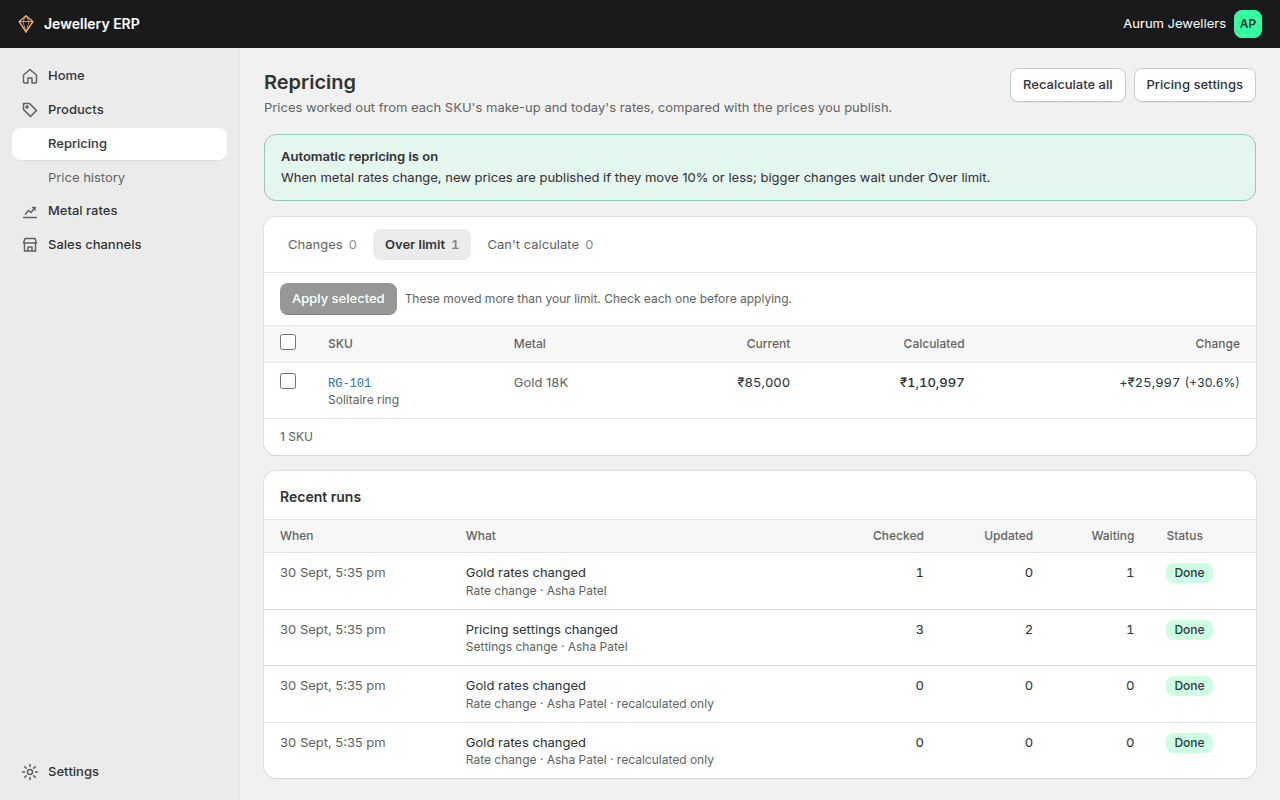
| Tab | What's in it | What you do |
|---|---|---|
| Changes | The calculated price differs from the live price, within your limit | Tick and Apply selected, or Apply all |
| Over limit | Moves bigger than your limit | Check each one, tick it and apply |
| Can't calculate | A metal rate or stone rate is missing; the reason is shown | Fix the rate or make-up, and it moves to Changes |
- Recalculate all refreshes every calculated price without publishing anything.
- Recent runs logs every pass: what started it, who, how many SKUs were checked, updated and left waiting, and whether it finished.
- Changing pricing settings (markup, GST, rounding, or turning automatic repricing on) also starts a run.
- Only the owner or an admin can apply or recalculate; staff can view the page.
The first time you turn automatic repricing on, many SKUs may show under Over limit, because their calculated price is far from the price typed in by hand. Check them once; after that, daily rate moves are small.